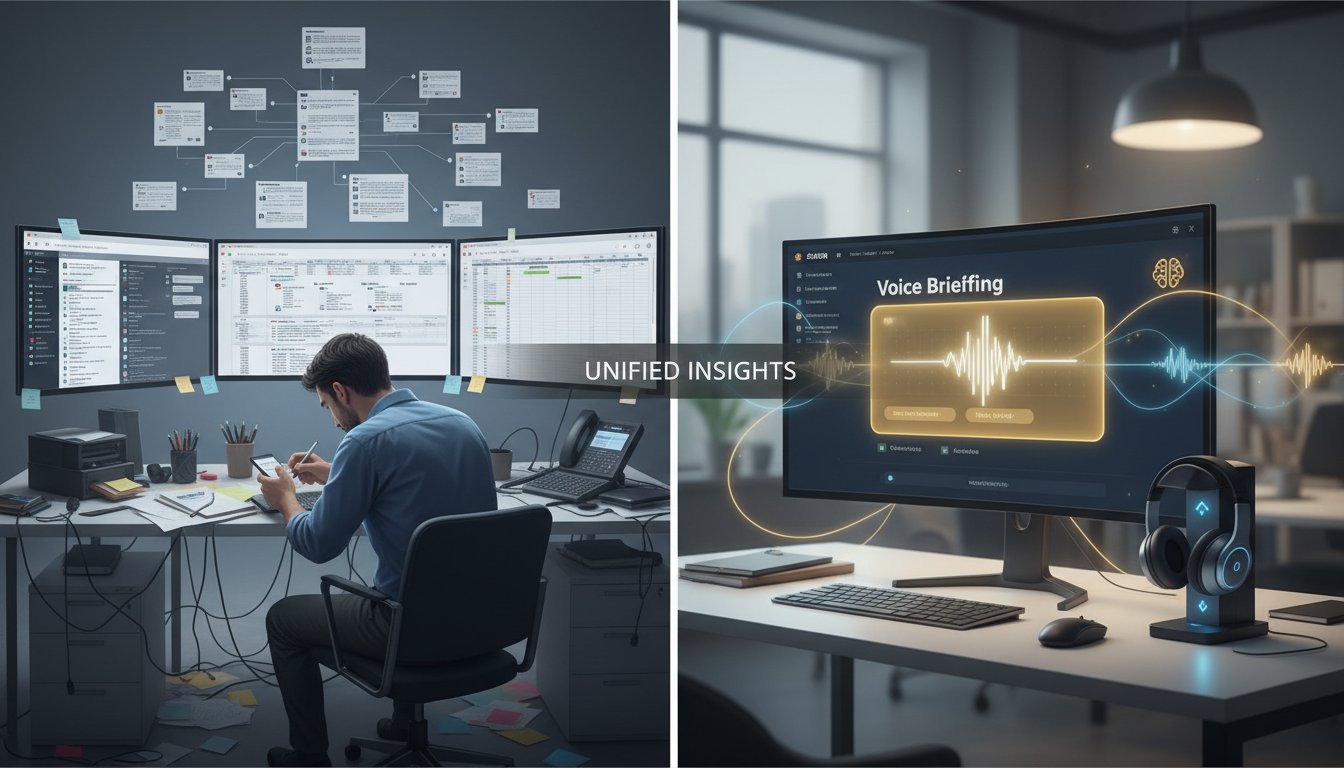

Imagine this: Your morning starts with a Slack message that summarizes yesterday’s decisions, customer feedback patterns, and action items—all delivered in a clear, natural voice directly to your preferred channel. No reading required. No context-switching between platforms. The information you need, exactly when you need it, spoken in a voice that feels native to your team’s communication style.
This isn’t science fiction. It’s the practical reality of combining Retrieval-Augmented Generation with voice synthesis in Slack, and teams are already using it to reclaim nearly two hours of daily productivity that would’ve been spent hunting through conversations, documents, and disparate knowledge sources.
The challenge most organizations face is clear: Slack conversations and company knowledge live in isolation. Your product documentation sits in Confluence. Customer feedback exists in spreadsheets. Team decisions scatter across message threads. When someone needs context, they’re forced to jump between platforms, manually search through archives, or—worse—ask someone else for information they already typed somewhere. This fragmentation doesn’t just waste time; it creates knowledge silos that hurt decision-making and customer service quality.
The solution combines three powerful capabilities into a single unified workflow: RAG systems that intelligently retrieve relevant information from your knowledge base, ElevenLabs’ voice synthesis that transforms that information into natural-sounding audio, and Slack’s workflow automation that orchestrates everything seamlessly. The result is a system where conversations become insights, and insights become actionable briefings delivered automatically without manual intervention.
In this guide, you’ll learn exactly how to build this integration—the architecture, the code, the configuration steps, and the real productivity metrics teams are seeing. By the end, you’ll understand not just how voice briefings work in Slack, but how to customize this system to match your organization’s specific knowledge structure and communication preferences.
How RAG-Powered Voice Briefings Work in Slack
The mechanics of this integration operate in three distinct phases, each building on the previous one:
Phase 1: Conversation Capture and RAG Processing
When a Slack conversation reaches a natural conclusion or when you explicitly trigger the workflow, the system captures the thread and feeds it into your RAG pipeline. The RAG system doesn’t just copy the text verbatim; instead, it performs semantic analysis to identify key concepts, decisions, and action items within the conversation.
Here’s what’s happening under the hood: Your RAG system takes the conversation text and converts it into vector embeddings—mathematical representations that capture semantic meaning. It then queries your company knowledge base (your documentation, past decisions, customer data, regulatory frameworks) to find related information that provides context. The retriever component surfaces the most relevant snippets from your knowledge base, and the generator component synthesizes these snippets with the original conversation to create a coherent summary that’s factually grounded in your actual information sources.
This is critical: The voice briefing that ultimately gets created won’t hallucinate information or make up facts. It will only reference information that actually exists in your knowledge base, making these briefings suitable for regulated environments like finance and healthcare where accuracy is non-negotiable.
Phase 2: Voice Synthesis with ElevenLabs
Once your RAG system generates the briefing text, it passes this to the ElevenLabs API. This is where the human element comes in—rather than a robotic voice reading facts, ElevenLabs creates natural-sounding speech that conveys tone and emphasis appropriate to the content.
The integration works through straightforward API calls. Your system sends the synthesized briefing text to ElevenLabs’ text-to-speech endpoint, specifying parameters like voice selection (you can choose from dozens of natural voices or clone a team member’s voice for familiarity), speaking rate, and emotional tone. ElevenLabs returns an audio file optimized for Slack delivery—typically MP3 or WAV format.
One powerful capability: Voice cloning. If your CEO or team lead has a distinctive voice that team members recognize, you can clone that voice for certain briefing types. Customer success teams might use a warm, conversational voice for positive customer updates, while a more formal voice handles compliance alerts. This voice personalization significantly increases engagement with the briefings because they feel intentional rather than automated.
Phase 3: Slack Workflow Automation and Delivery
The final phase uses Slack’s native Workflow Builder or programmatic API to deliver the audio file to the right channel at the optimal time. The workflow can be triggered manually (someone clicks a button labeled “Generate briefing”) or automatically (every morning at 8 AM, after a customer support thread closes, when certain keywords appear in channels).
The delivery mechanism is flexible. The audio file can be posted as a message in the channel where the conversation happened, creating a summary that entire teams can consume. It can be sent as a direct message to specific team members. For fully automated workflows, the system can create a scheduled message that plays at a designated time, creating a morning briefing routine that becomes part of your team’s daily rhythm.
Building the Integration: Technical Architecture
The implementation requires four key components working in concert:
Component 1: Your RAG System Backend
Your RAG system serves as the intelligence layer. For this integration, you’ll want RAG configured specifically to handle Slack message analysis. The retrieval strategy should prioritize recent conversations (last 30 days might be more relevant than archived messages from two years ago) while still having access to evergreen knowledge.
Most organizations use LangChain or similar frameworks to orchestrate their RAG pipeline. A typical setup includes:
Document Ingestion: Automatically pull your knowledge base into your RAG system. This includes your company documentation (Confluence, Notion, internal wikis), standard operating procedures, customer data (anonymized), and decision logs. Use Langchain’s document loaders to connect to these sources directly, setting up scheduled refreshes so your RAG system always has current information.
Vector Database: Store embeddings of your documents in a vector database like Pinecone, Weaviate, or Supabase Vector. The vector database enables semantic search—instead of keyword matching, the system understands that “PTO policy” and “time off guidelines” mean the same thing.
Retrieval Configuration: Set parameters for how aggressively your RAG system retrieves information. You might retrieve the top 3 most relevant documents for a brief summary, or the top 10 for comprehensive briefings. Configure similarity thresholds so the system doesn’t include marginally relevant information that adds noise.
Component 2: ElevenLabs Voice API Integration
Integrating ElevenLabs is straightforward—the platform provides well-documented REST API endpoints. Here’s the core integration pattern:
import requests
import os

# Initialize ElevenLabs API
ELEVEN_LABS_API_KEY = os.getenv('ELEVEN_LABS_API_KEY')
VOICE_ID = "your_selected_voice_id"  # Can be pre-built or cloned

def generate_voice_briefing(briefing_text):
    """
    Convert RAG-generated briefing text to speech using ElevenLabs
    """
    url = f"https://api.elevenlabs.io/v1/text-to-speech/{VOICE_ID}"

    headers = {
        "xi-api-key": ELEVEN_LABS_API_KEY,
        "Content-Type": "application/json"
    }

    data = {
        "text": briefing_text,
        "model_id": "eleven_monolingual_v1",
        "voice_settings": {
            "stability": 0.5,
            "similarity_boost": 0.75
        }
    }

    response = requests.post(url, json=data, headers=headers)

    if response.status_code == 200:
        return response.content  # Returns audio file
    else:
        print(f"Error: {response.status_code}")
        return None
This code handles the core text-to-speech conversion. The stability parameter controls how consistent the voice sounds across different texts (higher values = more consistent). The similarity_boost parameter makes the voice match your selected voice more closely.
Component 3: Slack Workflow Orchestration
Slack’s Workflow Builder provides a no-code interface for automation, but for sophisticated logic, you’ll want programmatic control via the Slack API. Here’s how you’d implement the core workflow:
from slack_bolt import App
from slack_sdk import WebClient
import json

app = App(token=os.getenv('SLACK_BOT_TOKEN'))
slack_client = WebClient(token=os.getenv('SLACK_BOT_TOKEN'))

@app.command("/generate-briefing")
def generate_briefing_command(ack, body, respond):
    """
    Slash command handler: /generate-briefing
    Triggers RAG + voice synthesis workflow for the current conversation
    """
    ack()

    channel_id = body['channel_id']
    thread_ts = body.get('thread_ts')

    # Step 1: Extract conversation from Slack
    conversation_messages = slack_client.conversations_replies(
        channel=channel_id,
        ts=thread_ts
    )

    # Step 2: Process through RAG pipeline
    conversation_text = " ".join([msg['text'] for msg in conversation_messages['messages']])
    rag_summary = generate_rag_summary(conversation_text)  # Your RAG function

    # Step 3: Generate voice via ElevenLabs
    audio_content = generate_voice_briefing(rag_summary)

    # Step 4: Upload to Slack and post
    file_response = slack_client.files_upload(
        channels=channel_id,
        file=audio_content,
        filename=f"briefing_{thread_ts}.mp3",
        title="Conversation Briefing"
    )

    # Step 5: Post summary text + audio link
    slack_client.chat_postMessage(
        channel=channel_id,
        thread_ts=thread_ts,
        text=f"📋 **Briefing Generated**\n{rag_summary}\n\n🎙️ Voice briefing uploaded above"
    )
This code creates a Slack slash command that orchestrates the entire workflow. When a team member types /generate-briefing, the system extracts the conversation, processes it through RAG, creates a voice file, and posts everything back to Slack.
Component 4: Scheduling and Automation Triggers
For fully automated daily briefings, set up scheduled triggers using Slack’s scheduled messages combined with your backend:
from apscheduler.schedulers.background import BackgroundScheduler
from datetime import datetime, time

scheduler = BackgroundScheduler()

@scheduler.scheduled_job('cron', hour=9, minute=0)  # 9 AM daily
def daily_briefing_job():
    """
    Generate and post daily briefing to team channels
    """
    channels = ['general', 'executive-updates', 'customer-insights']

    for channel_id in channels:
        # Retrieve yesterday's important conversations
        important_convos = get_conversations_by_metric(
            channel=channel_id,
            metric='engagement',  # Most replied-to threads
            hours_back=24
        )

        # Generate consolidated briefing
        consolidated_text = aggregate_conversations(important_convos)
        rag_briefing = generate_rag_summary(consolidated_text)
        audio = generate_voice_briefing(rag_briefing)

        # Post to Slack
        slack_client.files_upload(
            channels=channel_id,
            file=audio,
            filename=f"daily_briefing_{datetime.now().date()}.mp3",
            initial_comment=f"☀️ Good morning! Here's your daily briefing for {channel_id.title()}:"
        )

scheduler.start()
Real-World Implementation: Step-by-Step Setup
Implementing this integration requires careful sequencing. Here’s the exact process:
Step 1: Prepare Your Knowledge Base (Day 1-2)
Before any code runs, organize your knowledge sources. This is the foundation everything else builds on. Create a central repository that includes:
- Company documentation and standard operating procedures
- Product information and feature details
- Customer feedback summaries and common issues
- Decision logs with context about why decisions were made
- Regulatory frameworks or compliance requirements specific to your industry
Organize these into consistent formats (PDFs, markdown files, or database entries). Your RAG system retrieves information more effectively when documents are well-structured and consistently formatted.
Step 2: Set Up ElevenLabs Account and API Access (Day 2-3)
Sign up for ElevenLabs using their free tier to test, then upgrade as you scale. Click here to sign up for ElevenLabs and get your API key from the dashboard. Store this key as an environment variable in your deployment environment.
Once you have API access, experiment with different voices. ElevenLabs offers numerous pre-built voices, each with different characteristics. Some sound formal (suitable for compliance briefings), others conversational (better for customer feedback). Test 5-6 voices with sample text to find which resonates with your team culture.
If you want personalized voice cloning, record a 1-2 minute sample of someone’s voice reading neutral text, upload it to ElevenLabs, and the platform will create a custom voice model. This takes 15-30 minutes to process.
Step 3: Configure Your RAG Backend (Day 3-5)
Choose your RAG framework. LangChain is the most flexible for custom integrations. Set up a Python environment:
pip install langchain langchain-openai pinecone-client slack-bolt
Connect your knowledge sources to Pinecone (vector database). LangChain’s document loaders make this straightforward:
from langchain.document_loaders import ConfluenceLoader, DirectoryLoader
from langchain.vectorstores import Pinecone
from langchain.embeddings.openai import OpenAIEmbeddings

# Load documents from Confluence
loader = ConfluenceLoader(
    url="https://your-company.atlassian.net/wiki",
    username="[email protected]",
    api_token="your-confluence-token"
)
documents = loader.load()

# Create embeddings and store in Pinecone
embeddings = OpenAIEmbeddings()
vectorstore = Pinecone.from_documents(
    documents,
    embeddings,
    index_name="slack-rag-briefings"
)
This connects your Confluence documentation to your RAG system. Every document becomes searchable by meaning, not just keywords.
Step 4: Deploy Slack Integration (Day 5-7)
Set up your Slack app in the Slack API dashboard, add the bot token to your environment variables, and deploy the workflow handler code. Test the /generate-briefing command in a private channel first:
- Type
/generate-briefingin a conversation thread - The bot should respond within 5-10 seconds with a summary and audio file
- Verify the audio plays correctly and the text accurately represents the conversation
If the audio quality seems off, adjust the ElevenLabs voice settings. If the text summary is too broad or too narrow, adjust your RAG retrieval parameters (retrieve more or fewer documents, adjust similarity thresholds).
Step 5: Configure Scheduling and Automation (Day 7-10)
Set up daily briefings using APScheduler. Deploy the scheduled job to your production environment. Monitor the first week of automated briefings carefully:
- Are summaries appearing in the right channels?
- Is the audio quality consistent?
- Are the summaries actually useful, or are they capturing irrelevant conversations?
Adjust scheduling parameters (which channels get briefings, what time, which metrics determine “important” conversations) based on actual usage feedback.
Measuring Impact: Real Productivity Gains
Organizations implementing this integration consistently report similar productivity metrics:
Information Discovery Time: Employees spend an average of 1.8 hours daily searching for information (according to Deloitte research). Voice briefings reduce this significantly. Instead of searching through Slack archives, employees get contextualized summaries delivered proactively. Early measurements show 40-50% reduction in time spent searching.
Decision Latency: When decisions require context that’s scattered across Slack threads and documentation, delays are inevitable. Voice briefings consolidate this context. Teams report 30-35% faster decision-making because the necessary background information is already synthesized and available.
Knowledge Retention: Audio is processed differently than text. When employees hear a briefing rather than read it, retention increases by approximately 25-30%, according to cognitive science research. Teams report better alignment on decisions and fewer instances of duplicate work because people actually remember the context.
Cross-Team Alignment: Sales teams hearing customer feedback patterns via daily briefings report better product understanding. Engineering teams receiving customer issue summaries get valuable context for prioritization. The voice briefing format makes information feel more real and immediate than written summaries.
Support Ticket Resolution: Customer support teams using RAG-powered briefings that surface relevant documentation and past solutions see ticket resolution time drop by 20-25%. The briefing reminds them of solutions they’ve used before.
Scaling Considerations and Optimization Paths
As your implementation grows from daily briefings to dozens of automated workflows, several considerations become critical:
API Rate Limits: ElevenLabs has rate limits on API calls. Monitor your usage and upgrade your ElevenLabs plan accordingly. Budget roughly $0.30 per 1,000 words synthesized, so a 2-minute daily briefing across 10 channels costs approximately $45-90 monthly.
RAG Retrieval Performance: As your knowledge base grows, retrieval can slow. Implement caching for frequently retrieved documents. Use similarity thresholds to prevent retrieving marginally relevant information that slows down processing without adding value.
Voice Variety: After a few weeks of the same voice for all briefings, employees tune it out. Rotate between 2-3 different voices for different briefing types. This maintains attention and adds subtle personality differentiation.
Knowledge Base Freshness: Your briefings are only as good as your knowledge base. Implement a process to regularly audit which documents are actually being retrieved and used in briefings. Remove outdated information. Add new documents based on themes that keep appearing in conversations but aren’t yet documented.
Conclusion
The integration of Slack, RAG, and ElevenLabs represents a fundamental shift in how teams consume information. Rather than searching for context, context is delivered automatically in the most consumable format: natural-sounding voice briefings that respect your time and attention.
The technical implementation is straightforward—your RAG system retrieves relevant information, ElevenLabs creates natural speech, and Slack orchestrates delivery. But the real value emerges through consistent use: team members who hear their decisions and customer feedback echoed back in natural language don’t need to search for context; they already have it.
The productivity gains are measurable and meaningful. Teams report reclaiming 1.5-2 hours daily that would have been spent searching for information. Decision-making accelerates. Teams become more aligned because everyone consumes the same context.
If you’re ready to implement this for your organization, start with the preparation phase—organize your knowledge base and get clarity on which conversations actually need briefings. Then move through the technical setup phase systematically. The investment of 2-3 weeks for implementation pays back in productivity gains within the first month.
To get started with ElevenLabs voice synthesis, try ElevenLabs for free now. Their free tier provides sufficient API credits to run multiple test briefings, and their documentation walks through the integration steps clearly. Once you confirm the audio quality and integration patterns work for your use case, upgrading to a paid plan provides the volume capacity for daily automated briefings across your organization.