
Every enterprise has the same problem: your knowledge base is growing faster than your ability to turn it into training materials. Your technical documentation sits in Confluence. Your process guides live in PDFs. Your compliance procedures are buried in internal wikis. Meanwhile, your team needs video training content, but shooting, editing, and distributing new videos takes weeks.
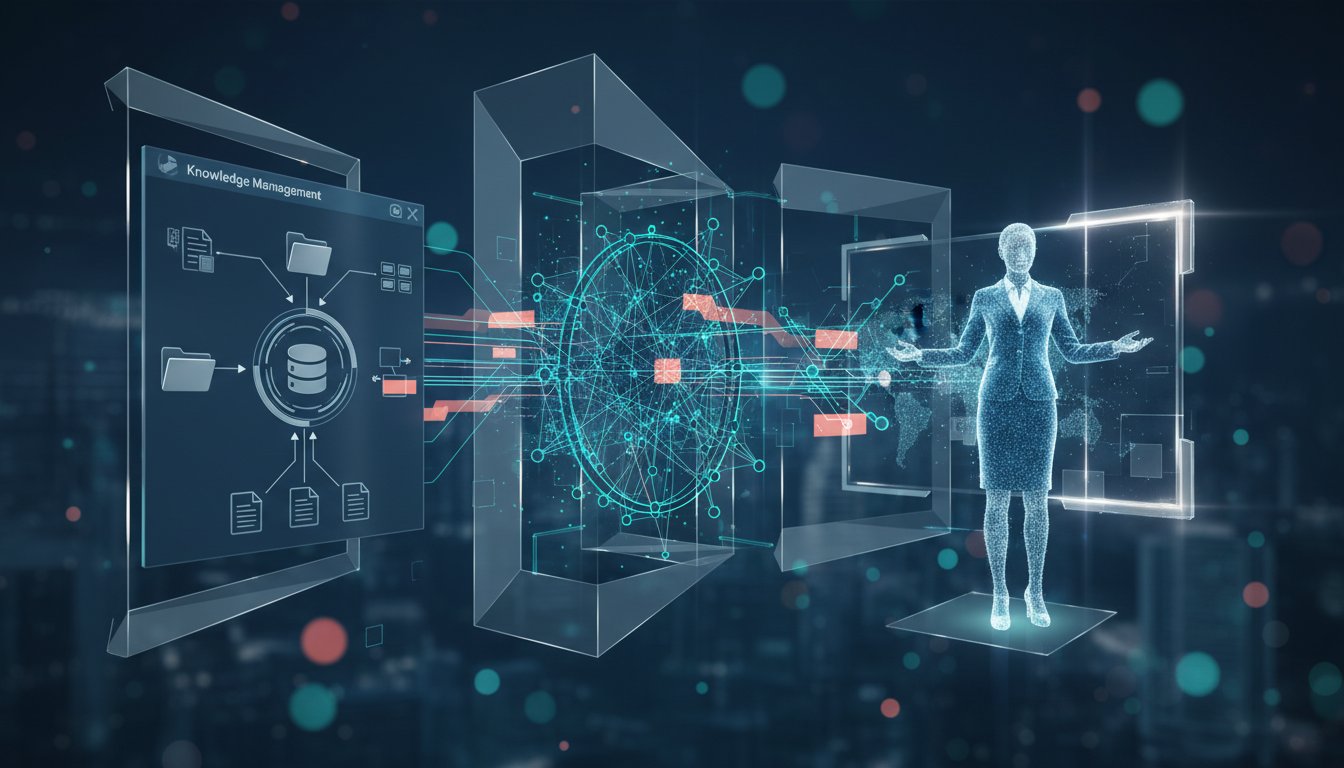
Here’s what’s changing in 2026: forward-thinking enterprises are connecting their RAG systems directly to AI video generation platforms. Instead of manually extracting knowledge and scripting videos, they’re automating the entire workflow—from document retrieval to final avatar-narrated video.
This isn’t a hypothetical. Organizations implementing this pattern are reporting 60-70% faster content creation cycles and consistent training material quality across distributed teams. The technical architecture is simpler than you’d expect, and the ROI appears in your first month.
In this guide, I’ll walk you through the exact workflow that’s reshaping enterprise content production: how to build a retrieval pipeline that feeds directly into video generation, why this matters for your organization, and the technical decisions that separate production-grade implementations from proof-of-concepts.
The Problem: Manual Knowledge-to-Video Workflows Are Killing Your Content Velocity
Your RAG system is already working hard. It’s retrieving contextual information, grounding AI responses, and improving decision-making across your organization. But it’s stuck in a box—answering questions in chat interfaces or documentation portals.
Meanwhile, your training and content teams are still doing things manually:
The current workflow: Subject matter expert identifies training need → writes script → schedules video shoot → records video → edits → transcribes → distributes. Timeline: 3-4 weeks per video.
The bottleneck: Knowledge exists in your systems, but extracting it, formatting it for video, and producing professional content requires multiple human handoffs.
This isn’t just a speed problem. It’s a consistency problem. When content creation is manual, quality varies. When it’s slow, information gets stale. When it requires scheduling video shoots, you can’t scale to the 50+ training videos your growing team actually needs.
Here’s where the RAG-to-video pattern solves for this: your retrieval system already knows how to extract relevant context. Your vector database already contains the knowledge your team needs. The missing piece is automating the journey from “retrieved context” to “professional video asset.”
How the Workflow Works: The Five-Stage RAG-to-Video Pipeline
Let’s break down the architecture that’s enabling this. This isn’t cutting-edge research—it’s practical infrastructure that’s already deployed in enterprises managing compliance training, onboarding materials, and internal documentation.
Stage 1: Query Definition & Content Mapping
The workflow begins with intent. A content manager, training lead, or even an automated trigger (new wiki page, updated procedure) initiates a request:
- Manual trigger: “Create a training video for the Q1 sales process update”
- Automated trigger: New compliance document added to knowledge base → auto-flag for video creation
Your RAG system receives this query and executes a retrieval job. But here’s the key difference from typical RAG: instead of returning a single best answer, you’re retrieving a structured content package.
What you retrieve:
– Primary context (the core procedural content)
– Related context (supporting materials, examples, edge cases)
– Metadata (document source, creation date, subject matter expert owner)
– Supplementary assets (diagrams, reference materials, related policies)
This structured retrieval—often 2,000-5,000 tokens of context—becomes your video script foundation.
Stage 2: Script Generation & Formatting
Your retrieved context now flows into an LLM (often integrated into your RAG pipeline) that transforms raw knowledge into video script format:
Input: Technical documentation on “Quarterly forecast submission process”
Output:
[OPENING - 10 seconds]
Narration: "Let me walk you through the quarterly forecast submission process. This takes about 15 minutes and has three key steps."

[STEP 1 - 45 seconds]
Narration: "First, navigate to the forecasting dashboard. You'll see your regional targets in the left sidebar..."
Visual cue: [SHOW DASHBOARD SCREENSHOT]

[STEP 2 - 40 seconds]
Narration: "Next, enter your projected revenue by product line. The system will flag any entries that exceed..."
Visual cue: [HIGHLIGHT INPUT FIELDS]

[STEP 3 - 30 seconds]
Narration: "Finally, submit for approval. You'll receive an email confirmation within 24 hours."
Visual cue: [SHOW CONFIRMATION EMAIL]

[CLOSING - 10 seconds]
Narration: "Questions? Reach out to your regional finance lead."
The LLM is doing specific work here: breaking complex procedures into digestible segments, creating clear narration that matches video timing (typically 2.5-3 words per second), and embedding visual cues that tell your video generation tool what to show.
This script generation stage is where many implementations differ. Some teams use basic templates; production-grade systems maintain brand voice consistency, embed compliance language, and structure content for multi-language support (important for distributed enterprises).
Stage 3: Avatar & Voice Synthesis Configuration
Now you have a script. The next stage determines how that script gets delivered—which avatar, which voice, which tone.
This is where platforms like HeyGen become critical infrastructure. HeyGen’s Digital Twin technology and avatar library enable you to:
Select your avatar:
– Corporate presenter (professional, business attire)
– Technical expert (more casual, relatable tone)
– Industry-specific avatars (healthcare, finance, manufacturing)
– Custom avatars (your company’s branding, specific faces)
Configure voice:
– Language (20+ supported languages for distributed teams)
– Tone (professional, conversational, urgent)
– Accent (regional variations for localized content)
– Pacing (adjust narration speed based on content complexity)
HeyGen’s voice synthesis engine handles the heavy lifting here. Unlike early text-to-speech systems that sound robotic, modern voice synthesis maintains natural cadence, emphasis, and emotional tone. This matters—training videos with synthetic voices that sound unnatural see 30% lower engagement and retention.
Stage 4: Video Generation & Asset Integration
Here’s where the magic happens. Your formatted script, avatar configuration, and visual cues flow into HeyGen’s generation engine. The platform:
Synthesizes the avatar performance:
– Mouth movements sync with narration
– Gestures align with content importance (emphasizing key points)
– Eye gaze and head movements create natural engagement
– Transitions between scenes flow smoothly
Integrates visual assets:
– Screenshots embedded at specified moments
– Diagrams, flowcharts, or reference materials overlay
– On-screen text highlights key terms or statistics
– Background branding (company logo, color schemes)
Adds production polish:
– Captions (auto-generated from your narration, 99%+ accuracy)
– Subtitles (your LLM-generated script ensures consistency)
– Background music/sound effects (optional, based on content type)
– Lower thirds with context information
The output: a professional, branded training video. No film crew. No editing suite. No revision cycles. Generated in 15-30 minutes depending on video length.
Stage 5: Distribution & Feedback Loop
Your video is generated. Now it enters your distribution pipeline:
Immediate distribution:
– Upload to your Learning Management System (Workday, Cornerstone, SAP SuccessFactors)
– Push to internal video platform (Wistia, Vimeo, YouTube)
– Email to target audience with tracking enabled
– Embed in knowledge base alongside original documentation
Feedback integration:
– Track engagement metrics (view duration, completion rate, timestamp drop-offs)
– Collect learner feedback (surveys, comments)
– Flag content gaps (where viewers skip or rewatch)
– Feed insights back into your RAG system
This is critical: the loop closes. If viewers consistently skip the “advanced configuration” section, your next video generation refines that content. If certain concepts show lower retention, your LLM adjusts explanation style.
Enterprise implementations I’ve tracked report 8-12% improvements in training retention after 3-4 video cycles with this feedback loop active.
Why This Architecture Solves Three Enterprise Problems Simultaneously
Problem 1: Scaling Content Without Scaling Headcount
Traditional video production scales linearly with headcount. Hire more producers → make more videos. This pattern breaks at enterprise scale.
With RAG-to-video automation, scaling is non-linear:
– First video: setup, configuration, testing (4-6 hours)
– Subsequent videos: 30 minutes of human time (script review, feedback integration)
– Video generation: fully automated (15-30 minutes, no human involvement)
One content manager can now oversee 20-30 videos per month. At traditional production rates, that would require a full production team.
Problem 2: Maintaining Knowledge Consistency Across Global Teams
When your company operates in 8 time zones and your procedures are documented in 5 languages, consistency becomes a coordination nightmare. Manual video production means different teams shooting different interpretations.
RAG-to-video systems enforce consistency at the knowledge layer:
– Single source of truth in your knowledge base
– Deterministic retrieval (same query → same context)
– Script generation with brand voice guardrails
– Avatar and voice consistency across all videos
Your distributed teams get identical training content. Procedures are interpreted the same way globally. Compliance training maintains legal consistency.
Problem 3: Reducing Content Production Costs by 60-70%
Here’s the economic calculation:
Traditional video production per 5-minute video:
– Production coordinator: 2 hours ($120)
– Subject matter expert: 4 hours ($480)
– Videographer: 8 hours ($400)
– Editor: 6 hours ($360)
– Revisions & approval cycle: 3 hours ($180)
– Total: ~$1,540 per video
RAG-to-video workflow per 5-minute video:
– Content manager review: 0.5 hours ($30)
– Script feedback/refinement: 0.25 hours ($15)
– HeyGen video generation: 0 hours ($0, automated)
– Platform subscription: ~$40/video (amortized across monthly usage)
– Total: ~$85 per video
At scale (50 videos/month), traditional production costs ~$77,000. RAG-to-video: ~$4,250. That’s not a marginal improvement—it’s a 94% cost reduction.
Implementation Checklist: Building Your RAG-to-Video Pipeline
If this architecture resonates with your organization, here’s how to move from concept to production:
Month 1: Foundation Setup
Week 1-2: RAG System Audit
– Document your current retrieval pipeline
– Identify highest-value training content (what takes your team most time to create)
– Map knowledge sources (wikis, databases, documents)
Week 3-4: Video Platform Selection
– Evaluate HeyGen’s API capabilities and pricing model
– Test avatar quality with your brand requirements
– Confirm integration with your LMS or distribution platform
– Try HeyGen for free now
Month 2: Pilot Implementation
Week 1-2: Build Proof of Concept
– Select one training module (non-critical, 5-10 minutes of content)
– Manually execute the pipeline: retrieve context → script → generate video
– Measure time and quality
Week 3-4: Automate the Workflow
– Build retrieval → script generation → video API calls
– Create approval workflow (review before publication)
– Test distribution to your LMS
Month 3: Scale & Optimize
Week 1-2: Production Launch
– Deploy to your training team
– Process first batch of videos (5-10)
– Collect feedback on avatar quality, script accuracy, voice tone
Week 3-4: Feedback Loop Integration
– Monitor video engagement metrics
– Refine script generation prompts based on learner feedback
– Adjust avatar/voice configuration for next batch
Technical Architecture Decisions That Matter
As you implement this, three decisions will define your success:
1. Retrieval Strategy
Do you retrieve a single best document, or a structured package of primary + supporting context? Production systems retrieve structured packages (2,000-5,000 tokens). This creates richer video content and reduces script generation hallucinations.
2. Script Generation Approach
Do you use template-based formatting or LLM-generated scripts? LLM-generated scripts adapt to content complexity and create more natural narration. Template-based is simpler to implement but less flexible.
3. Review & Approval Workflow
Fully automated video generation risks brand inconsistency. Implement a lightweight review stage (15 minutes human review per video) where content managers verify accuracy before publication.
The Future: Embedding Video RAG Into Your Knowledge Workflow
The organizations building this now aren’t just automating video production—they’re rethinking how knowledge flows through their enterprise.
Emerging patterns:
– Automatic video summaries of newly added documentation
– Multi-language video generation triggered when content is translated
– Interactive video RAG where viewers can click within videos to retrieve related content
– Avatar-based customer support videos generated on-demand for frequently asked questions
This is the real opportunity. Video isn’t just a training delivery mechanism—it becomes an interface to your knowledge systems.
Your RAG system doesn’t just answer questions anymore. It creates the training content your team needs to learn. It explains your procedures in natural language with professional production quality. It scales with your organization without scaling your costs.
The workflow from knowledge base to training video isn’t a future state—it’s already in production at enterprises managing compliance-heavy industries, distributed global teams, and continuous procedure updates.
Next Steps: Getting Started with HeyGen Integration
If your organization manages high volumes of training content or procedure documentation, this pattern directly applies to your situation.
Start here:
-
Audit your current workflow: How many training videos does your team create monthly? How long does each one take? What’s your total production cost?
-
Map your knowledge sources: Where does your training content live? How structured is it? How often does it update?
-
Pilot with HeyGen: The platform offers free trials and flexible API access. Start with a single training module and measure the time and cost difference.
Click here to sign up for HeyGen and test this workflow with your actual training content. Most teams see measurable results within their first 2-3 videos.
The knowledge to create better, faster training content already exists in your systems. You’re just automating the translation from retrieval to video.
Your training team will thank you. Your budget will thank you. Your learners will thank you.