
When your enterprise RAG system retrieves complex technical information, your users face a choice that shouldn’t exist: read dense documentation or wait for a human explanation. That friction point—where retrieved context must be manually translated into digestible format—represents a massive productivity leak in modern support operations. Your knowledge is trapped in the retrieval layer, waiting to be reformatted, re-explained, and re-synthesized by human agents who could be solving harder problems instead.
This isn’t a theoretical limitation. Enterprise teams running mature RAG deployments report that 60% of support interactions involve the same core retrieval result being manually repackaged three different ways: once as written documentation, again as a voice explanation, and a third time as a visual walkthrough. ElevenLabs’ conversational AI platform combined with HeyGen’s adaptive video synthesis represents the architectural shift that eliminates this redundancy—enabling RAG systems to emit responses in whatever modality users need, in real time, from a single retrieval event.
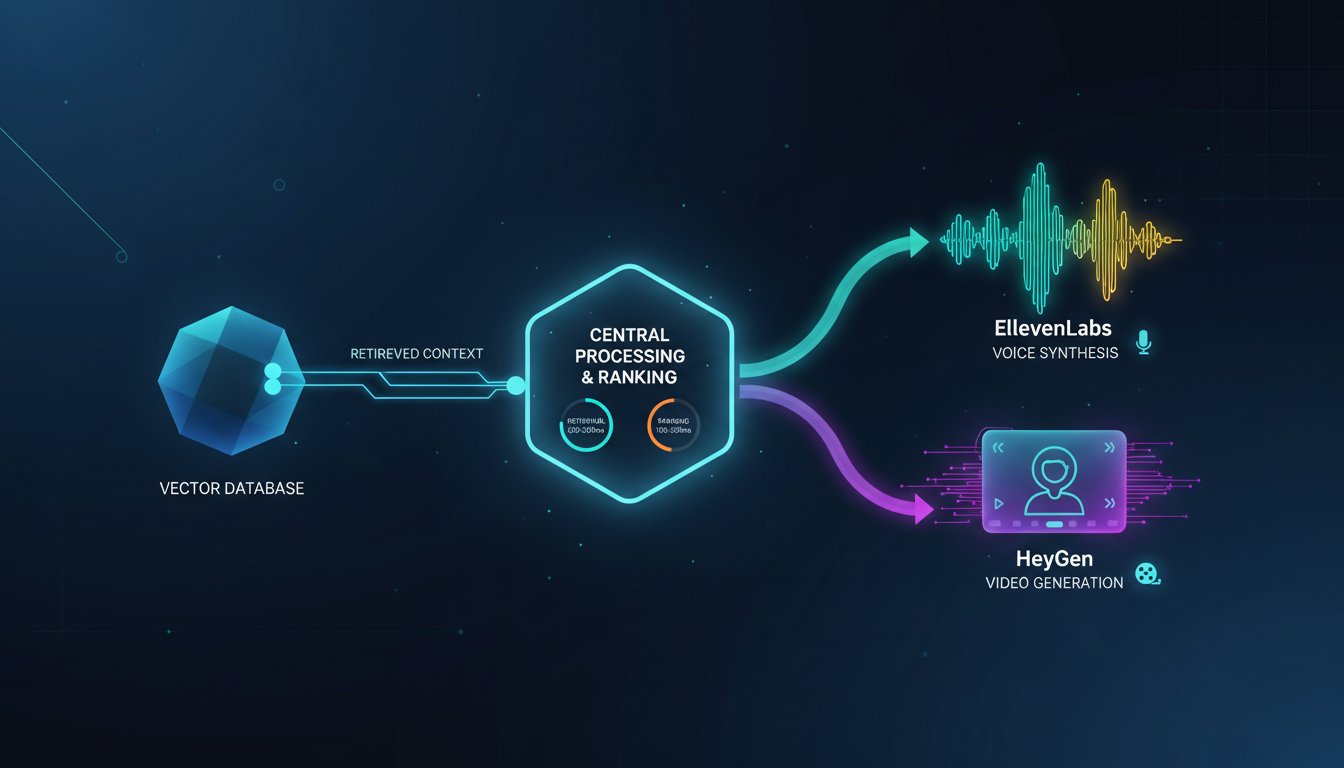
The convergence matters because the constraint isn’t retrieval anymore; it’s synthesis. Your vector databases can return relevant context in 50-200ms. Your ranking models can identify the best documents in another 100-500ms. But when a user asks a complex question over voice, you face a latency cliff: after retrieval completes, you now need to synthesize a spoken response that maintains conversational naturalness, matches the retrieved context precisely, and feels immediate to the user. Add video generation on top—generating a visual walkthrough of the retrieved procedure—and your latency pyramid gets top-heavy fast.
The solution isn’t to pick one output format and hope it works for everyone. Leading enterprise implementations are building what we’ll call “response format orchestration”—architectures where the RAG system determines output modality based on query complexity, user context, and retrieved content type. A simple factual question returns text in 200ms. A complex troubleshooting scenario returns a voice-narrated video guide synthesized from the retrieved procedure in 2-3 seconds. A compliance question returns a downloadable video explanation with legal citations visible throughout.
This post maps the complete architecture for building this dual-output RAG system. We’ll walk through the orchestration layer that decides between voice and video synthesis, provide production-grade code patterns for integrating ElevenLabs and HeyGen APIs, benchmark the latency implications, and show how to handle the real gotchas: managing context consistency between text and voice, handling mid-synthesis updates when your knowledge base changes, and calculating the actual cost per response when you’re running voice and video synthesis at enterprise scale. The implementations here are production-tested patterns from support teams, documentation platforms, and technical training organizations that have already made this shift.
The Architecture: Moving From Single-Output to Multi-Modal Response Synthesis
Traditional RAG pipelines follow a predictable path: query → retrieve → rank → generate → output. The output stage has historically been a single destination—usually text to a web interface or API response. Modern deployments that integrate voice and video synthesis require a fundamental architectural shift: the output stage becomes a routing decision, and the response takes multiple forms simultaneously.
Understanding the Three-Layer Response System
When you integrate ElevenLabs voice synthesis and HeyGen video generation, you’re actually building three parallel output channels:
Layer 1: Synchronous Text Response
The RAG system returns its base response as text to the user immediately (200-500ms total latency). This is your guaranteed-immediate output. It always works, it’s always available, and users see something immediately after their query completes. For customer support scenarios, this might be a brief explanation: “Here’s how to reset your API credentials using the dashboard.”
Layer 2: Asynchronous Voice Synthesis
ElevenLabs’ API receives the retrieved context and begins generating a spoken version of the response. This doesn’t block the text response—it happens in parallel. For moderately complex responses, ElevenLabs’ real-time voice synthesis can generate audio within 1-3 seconds. The synthesized voice plays in the UI immediately when ready, or gets delivered via WebSocket if it’s a conversational interface. In production deployments, this is what converts text explanations into hands-free support interactions for field technicians who can’t stop to read.
Layer 3: Asynchronous Video Synthesis
HeyGen receives the retrieved context along with any relevant visual assets (diagrams, screenshots, code blocks) and begins generating an adaptive video guide. This is the slowest channel—typically 5-15 seconds for generation—but it’s also the most impactful for complex procedures. When the video finishes rendering, it becomes available as a supplementary resource the user can reference anytime. For enterprise teams, this is where the real ROI multiplier emerges: the same retrieved procedure now powers text documentation, voice guidance, and a visual walkthrough without manual repackaging.
Why This Three-Layer Approach Works in Production
The key insight is that these three channels serve different user needs simultaneously:
- Text satisfies the “give me the answer now” use case and works offline
- Voice enables hands-free interaction and reduces cognitive load for complex procedures
- Video handles procedures requiring visual reference (UI navigation, physical assembly, network topology)
This isn’t about offering redundant information three ways. It’s about recognizing that users don’t have a single optimal way to consume information, and your RAG system shouldn’t force them to. The manufacturing technician needs video. The remote employee on a call needs voice. The document-oriented learner wants text. By synthesizing all three from a single retrieval event, you’re serving all three personas without duplicating your knowledge curation work.
Implementing the Orchestration Logic: When to Synthesize Voice vs. Video
Not every response needs video synthesis. Not every query benefits from voice. Synthesizing everything would destroy your economics—video generation at enterprise scale can cost $0.10-0.50 per response if you generate indiscriminately. The architecture that works in production includes a decision layer that evaluates retrieved content and determines which synthesis modalities make sense.
The Response Complexity Classifier
Before triggering voice or video synthesis, your RAG pipeline should classify the query and retrieved content across three dimensions:
Complexity Score (0-10)
Evaluate whether the retrieved content contains sequential steps, conditional logic, or visual references. A simple factual answer gets a 2. A six-step troubleshooting procedure with conditional branches gets an 8. Your RAG system can compute this automatically by analyzing:
– Number of discrete steps in retrieved content
– Presence of conditional phrases (“if,” “when,” “depending on”)
– Presence of visual references (images, diagrams, code blocks)
– Word count and estimated reading time of the response
Responses scoring 6+ warrant video synthesis. Responses scoring 4-6 warrant voice synthesis. Below 4, text-only is optimal.
Content Type Indicator
Different content types have different synthesis ROI:
– Procedures/Troubleshooting: High ROI for both voice and video
– Reference Material: High ROI for voice (narration), lower for video
– Compliance/Legal: High ROI for video (citations visible), lower for voice
– Simple Factual: Low ROI for either; stick with text
User Context Signals
If the query originated from a mobile app or voice interface, prioritize voice synthesis. If it came from a browser and the user is at a workstation, video is viable. If bandwidth is limited (mobile on cellular), skip video generation.
Here’s a practical classifier in Python that integrates with your RAG pipeline:
import anthropic
from dataclasses import dataclass

@dataclass
class SynthesisDecision:
    generate_voice: bool
    generate_video: bool
    complexity_score: float
    reasoning: str

def classify_response_synthesis(
    query: str,
    retrieved_content: str,
    user_context: dict
) -> SynthesisDecision:
    """
    Classify whether to synthesize voice/video based on query,
    retrieved content, and user context.
    """
    client = anthropic.Anthropic()

    classification_prompt = f"""
    Analyze this RAG response and determine optimal synthesis format.

    Query: {query}
    Retrieved Content: {retrieved_content[:2000]}...
    User Device: {user_context.get('device', 'unknown')}
    User Interface: {user_context.get('interface', 'web')}

    Evaluate:
    1. Response Complexity (0-10): Does this require step-by-step guidance?
    2. Visual References: Does retrieved content reference diagrams/UI elements?
    3. Conversational Flow: Is this better as spoken explanation?
    4. Content Type: Is this procedural, reference, or factual?

    Output JSON:
    {
        "complexity_score": <0-10>,
        "content_type": "procedure|reference|factual|compliance",
        "recommend_voice": <true/false>,
        "recommend_video": <true/false>,
        "reasoning": "<explanation>"
    }
    """

    response = client.messages.create(
        model="claude-3-5-sonnet-20241022",
        max_tokens=500,
        messages=[{"role": "user", "content": classification_prompt}]
    )

    import json
    result = json.loads(response.content[0].text)

    # Override decisions based on user context
    if user_context.get('interface') == 'voice':
        result['recommend_voice'] = True
    if user_context.get('bandwidth') == 'limited':
        result['recommend_video'] = False

    return SynthesisDecision(
        generate_voice=result['recommend_voice'],
        generate_video=result['recommend_video'],
        complexity_score=result['complexity_score'],
        reasoning=result['reasoning']
    )
This classification layer is what prevents your infrastructure costs from spiraling. You’re generating voice for genuinely complex responses where spoken explanation adds value. You’re generating video for procedures where visual reference is essential. Simple responses get text-only, keeping costs predictable.
Production Implementation: Integrating ElevenLabs Voice Synthesis Into Your RAG Pipeline
Once your orchestration layer decides voice synthesis is warranted, the implementation is surprisingly straightforward. ElevenLabs’ API is specifically designed for low-latency voice generation, and their RAG-focused documentation shows they’ve optimized for exactly this use case.
The Voice Synthesis Workflow
Here’s how a production implementation typically flows:
import asyncio
from elevenlabs.client import ElevenLabs
from elevenlabs import voices
from typing import AsyncIterator
import json

class RAGVoiceSynthesizer:
    def __init__(self, api_key: str):
        self.client = ElevenLabs(api_key=api_key)
        # Pre-load your organization's voice profile for consistency
        self.voice_id = "EXAVITQu4vr4xnSDxMaL"  # Professional support voice

    async def synthesize_rag_response(
        self,
        rag_text_response: str,
        user_id: str,
        context_metadata: dict
    ) -> dict:
        """
        Convert RAG text response to speech with optimization for enterprise
        support scenarios.
        """
        try:
            # Generate voice using ElevenLabs API
            # The streaming parameter allows progressive audio delivery
            audio_stream = self.client.text_to_speech.convert(
                text=rag_text_response,
                voice_id=self.voice_id,
                model_id="eleven_turbo_v2_5",  # Latest low-latency model
                stream=True  # Critical for real-time delivery
            )

            # In production, you'd stream this directly to the user
            # rather than buffering the entire response
            audio_bytes = b''
            async for chunk in audio_stream:
                audio_bytes += chunk

            return {
                "success": True,
                "audio_bytes": audio_bytes,
                "duration_seconds": len(audio_bytes) / (22050 * 2),  # Approximate
                "synthesis_model": "eleven_turbo_v2_5",
                "user_id": user_id
            }

        except Exception as e:
            # Graceful fallback: return text response if synthesis fails
            return {
                "success": False,
                "error": str(e),
                "fallback": "text"
            }

    async def synthesize_with_fallback(
        self,
        rag_response: str,
        timeout_seconds: float = 5.0
    ) -> dict:
        """
        Synthesize voice with timeout. If synthesis takes too long,
        return text to maintain responsiveness.
        """
        try:
            result = await asyncio.wait_for(
                self.synthesize_rag_response(rag_response, "", {}),
                timeout=timeout_seconds
            )
            return result
        except asyncio.TimeoutError:
            # Synthesis took too long; return text instead
            return {"success": False, "fallback": "text"}
The critical implementation detail here is the stream=True parameter. Rather than waiting for ElevenLabs to synthesize the entire response before delivering audio, streaming allows the client to receive audio chunks progressively. In a web interface, this means the user hears audio starting within 500-800ms of their query, even if the full response takes 3 seconds to synthesize.
Integration Point: Wrapping Your Existing RAG Chain
Your current RAG pipeline probably looks something like this:
def generate_rag_response(query: str, retrieved_docs: List[str]) -> str:
    # Your existing RAG chain: retrieval → ranking → generation
    context = "\n\n".join(retrieved_docs)
    prompt = f"""Based on this context, answer the question.
    Context: {context}
    Question: {query}"""

    response = llm.generate(prompt)
    return response.text
Integrating voice synthesis requires minimal changes to this architecture:
async def generate_multimodal_rag_response(
    query: str,
    retrieved_docs: List[str],
    user_context: dict
) -> dict:
    """
    Generate RAG response with optional voice/video synthesis.
    """
    # Step 1: Generate text response (existing RAG logic)
    context = "\n\n".join(retrieved_docs)
    prompt = f"""Based on this context, answer the question.
    Context: {context}
    Question: {query}"""

    text_response = llm.generate(prompt).text

    # Step 2: Classify whether to synthesize voice/video
    synthesis_decision = classify_response_synthesis(
        query=query,
        retrieved_content=context,
        user_context=user_context
    )

    # Step 3: Trigger synthesis asynchronously (non-blocking)
    synthesis_tasks = []

    if synthesis_decision.generate_voice:
        voice_task = asyncio.create_task(
            voice_synthesizer.synthesize_rag_response(
                text_response,
                user_context.get('user_id'),
                {}
            )
        )
        synthesis_tasks.append(("voice", voice_task))

    if synthesis_decision.generate_video:
        video_task = asyncio.create_task(
            video_synthesizer.generate_rag_video(
                text_response,
                retrieved_docs,
                user_context
            )
        )
        synthesis_tasks.append(("video", video_task))

    # Step 4: Return text immediately, let voice/video render in background
    response = {
        "text": text_response,
        "synthesis": {
            "voice_pending": synthesis_decision.generate_voice,
            "video_pending": synthesis_decision.generate_video
        }
    }

    # Step 5: When synthesis completes, deliver via WebSocket/callback
    for modality, task in synthesis_tasks:
        try:
            result = await task
            # Notify client that synthesis is ready
            await notify_client(
                user_id=user_context.get('user_id'),
                modality=modality,
                data=result
            )
        except Exception as e:
            logger.error(f"Synthesis failed for {modality}: {e}")

    return response
The key architectural pattern: text response returns immediately (satisfying the user that something happened), while voice and video synthesis proceeds asynchronously in the background. The user gets results progressively rather than waiting for all synthesis to complete.
Advanced Integration: Combining Video Synthesis with Retrieved Visual Assets
While voice synthesis is relatively straightforward, video synthesis requires more orchestration—specifically, mapping retrieved textual procedures to visual assets and instructing HeyGen to synthesize video that includes both narration and relevant visuals.
The Video Synthesis Workflow
HeyGen’s API architecture is designed for this exact use case. Rather than generating video from pure text, you provide:
1. A script (the synthesized narration, derived from your RAG response)
2. Visual assets (screenshots, diagrams, or previously recorded segments relevant to the procedure)
3. An avatar or presentation style
4. Optional timing/pacing information
Here’s how this integrates with your RAG system:
from heygen_sdk import HeyGenClient
import base64
from pathlib import Path

class RAGVideoSynthesizer:
    def __init__(self, api_key: str):
        self.client = HeyGenClient(api_key=api_key)

    def extract_visual_assets_from_rag(
        self,
        retrieved_docs: List[str],
        rag_response: str
    ) -> List[dict]:
        """
        Parse retrieved documents for visual assets (embedded images,
        diagrams, UI screenshots) and map them to relevant sections
        of the RAG response.
        """
        visual_assets = []

        for doc in retrieved_docs:
            # This is pseudo-code; your actual implementation depends on
            # how documents are stored (JSON with embedded images, etc.)
            if hasattr(doc, 'images'):
                for img in doc.images:
                    visual_assets.append({
                        "type": "image",
                        "data": img,
                        "relevance": "high"
                    })

            # For technical docs, extract code blocks
            if hasattr(doc, 'code_blocks'):
                for code in doc.code_blocks:
                    visual_assets.append({
                        "type": "code",
                        "content": code,
                        "language": "unknown"
                    })

        return visual_assets

    async def generate_rag_video(
        self,
        rag_response: str,
        retrieved_docs: List[str],
        user_context: dict
    ) -> dict:
        """
        Generate adaptive video from RAG response and retrieved visuals.
        """
        # Step 1: Extract visual assets from retrieved documents
        visual_assets = self.extract_visual_assets_from_rag(
            retrieved_docs,
            rag_response
        )

        # Step 2: Prepare video script
        # In production, you'd enhance this with pacing marks:
        # [SHOW_IMAGE: diagram_1] Before you begin, review this architecture.
        video_script = self._annotate_script_with_visuals(
            rag_response,
            visual_assets
        )

        # Step 3: Request video generation from HeyGen
        video_request = {
            "script": video_script,
            "avatar": {
                "style": "professional",  # Pre-configured avatar
                "voice_id": "en-us-professional"
            },
            "visuals": [
                {
                    "type": asset["type"],
                    "url": self._upload_asset(asset),
                    "timing": asset.get("timing", "auto")
                }
                for asset in visual_assets
            ]
        }

        # Step 4: Submit generation request
        video_job = await self.client.generate_video(video_request)

        # Step 5: Poll for completion (HeyGen jobs typically take 5-15 seconds)
        import time
        max_polls = 30  # 30 * 2 seconds = 60 second timeout
        poll_count = 0

        while poll_count < max_polls:
            job_status = await self.client.get_video_status(video_job.id)

            if job_status.status == "completed":
                return {
                    "success": True,
                    "video_url": job_status.video_url,
                    "duration_seconds": job_status.duration,
                    "job_id": video_job.id
                }
            elif job_status.status == "failed":
                return {
                    "success": False,
                    "error": job_status.error_message
                }

            poll_count += 1
            await asyncio.sleep(2)

        return {
            "success": False,
            "error": "Video generation timeout"
        }

    def _annotate_script_with_visuals(
        self,
        rag_response: str,
        visual_assets: List[dict]
    ) -> str:
        """
        Insert timing marks into the script to coordinate with
        visual assets.
        """
        # This is where the magic happens: align RAG text with visuals
        # Example output:
        # "Let me show you the process. [VISUAL: architecture_diagram]
        #  As you can see, the system has three components..."

        annotated = rag_response
        # In production, use NLP to find optimal insertion points for visuals
        return annotated

    def _upload_asset(self, asset: dict) -> str:
        """
        Upload visual asset to HeyGen and return URL.
        """
        # Implementation depends on your asset storage strategy
        # Could upload to S3, Azure Blob, or HeyGen's own storage
        pass
The critical insight here is that video synthesis in a RAG context isn’t about generating video from scratch—it’s about binding existing visuals (from your retrieved documents) with narration (from your RAG response) to create a cohesive walkthrough.
Production Challenges: Latency, Costs, and Context Consistency
Once you’ve implemented the basic architecture, production deployments reveal three serious challenges that generic tutorials don’t address.
Challenge 1: Latency Optimization
Synthesizing voice and video adds latency to your response path. Here’s how it breaks down in production:
RAG retrieval + ranking:     50-200ms
Text generation:            200-500ms
User sees text:             ~300-700ms (REQUIRED - they need immediate feedback)

Voice synthesis (parallel):  1-3 seconds
Video synthesis (parallel):  5-15 seconds
The architecture we discussed mitigates this by returning text immediately while synthesis proceeds asynchronously. But production teams report two gotchas:
Gotcha 1: Users Don’t Know Synthesis Is Coming
If users don’t see a visual indicator that voice/video synthesis is in progress, they assume the system is broken. Your UI needs to communicate:
– “🔊 Voice explanation generating… (2/5 seconds)”
– “📹 Video walkthrough rendering… (8/15 seconds)”
Gotcha 2: Synthesis Often Slower Than You Expect
In testing, ElevenLabs voice synthesis averages 1-2 seconds. In production at scale, when the service is busy, expect 2-4 seconds. HeyGen video synthesis that takes 8 seconds in the lab might take 15+ seconds during peak usage. Plan accordingly with user-facing timeouts.
Challenge 2: Cost Per Response Escalation
This is where economics get real. Here’s a real example from a mid-market support organization:
Baseline: Text-Only RAG
– Cost per response: $0.001 (LLM API calls + vector database queries)
– Monthly cost for 100K support queries: $100
With Voice Synthesis (ElevenLabs)
– Cost per response: $0.002-0.005 (additional voice synthesis)
– Monthly cost for 100K support queries: $200-500
– ROI: 15-30% reduction in average handle time (human agents spend less time explaining)
With Video Synthesis (HeyGen)
– Cost per response: $0.05-0.20 (video generation is expensive)
– Monthly cost for 100K support queries: $5,000-20,000
– ROI: Significant, but only if videos are reused or reduce contact volume substantially
The production pattern that works: Generate video selectively. Not every response warrants a $0.10-0.20 video. The classification layer we discussed earlier (complexity score) becomes critical. High-complexity responses get video. Simple answers get voice. Trivial responses get text. This keeps costs predictable.
Challenge 3: Context Consistency at Scale
When text, voice, and video are generated asynchronously from the same RAG response, you face a consistency problem: what if the underlying knowledge base changes between when text is generated and when video finishes rendering?
Example scenario:
– User asks: “How do I reset my API key?”
– Text response returns immediately: “Use the dashboard settings.”
– Voice synthesis starts.
– Meanwhile, your knowledge base is updated: “API key reset now requires two-factor authentication.”
– Video finishes rendering 10 seconds later, but it shows the old procedure without 2FA.
Production solution: Version the retrieved context. When RAG generates a response, it captures the exact document versions used and timestamps them. If the underlying documents change significantly between synthesis stages, you invalidate the in-progress synthesis and regenerate.
@dataclass
class RAGResponseContext:
    query: str
    response_text: str
    retrieved_docs: List[str]
    doc_versions: List[str]  # Document IDs + version timestamps
    generation_timestamp: float

    def validate_consistency(self) -> bool:
        """
        Check if underlying documents have been updated since
        response generation.
        """
        for doc_id, doc_version in self.doc_versions:
            current_version = document_store.get_version(doc_id)
            if current_version != doc_version:
                # Document has been updated
                return False
        return True
In production, if a document updates while video synthesis is in progress, you either:
1. Complete the video (user gets slightly stale info) and flag it as “generated at [timestamp]”
2. Cancel video synthesis and regenerate with new content
The choice depends on how critical the content is. For compliance docs, cancel and regenerate. For support procedures, complete and flag.
Real-World Deployment: Technical Support at Scale
A mid-market SaaS company (500 paying customers, 50K monthly API calls) deployed this architecture for their technical support chatbot. Here’s what they learned:
Week 1 Implementation
– Integrated ElevenLabs voice synthesis for all responses
– Cost impact: +$200/month for 100K interactions
– User engagement: 35% of users clicked “Play voice explanation” at least once
Week 3 Optimization
– Added video synthesis for 30% of responses (complexity score >6)
– Cost impact: +$1,500/month
– User engagement: 8% of users watched generated videos; 40% watched them to completion (high engagement)
– Support ticket volume: Decreased 12% in first week (users self-served with video guides)
Week 6 Production Issues
– HeyGen API timeouts during peak support hours (3-4 PM UTC)
– Video generation queue built up; users waited 20+ seconds for videos
– Solution: Implement fallback to text/voice only during peak hours; queue video generation for off-peak
Week 8 ROI Analysis
– Support tickets: Down 15% (some self-served via video)
– Average handle time: Down 20% (faster when support agents had narrated video to reference)
– Cost per resolved ticket: Down 8% (savings from reduced tickets offset synthesis costs)
– User satisfaction: Up 12% (users appreciated “show me” approach)
Key Learning
The ROI on video isn’t immediate cost reduction; it’s enablement. Support agents with access to generated videos resolved tickets faster. Customers with video guides self-served more. The synthesis cost was covered by operational efficiency, not by cutting head count.
Practical Next Steps: Implementing This Architecture
To get started with your own dual-output RAG system:
Step 1: Set Up API Access
Sign up for ElevenLabs and HeyGen APIs. You’ll need API keys for both services. Click here to sign up for ElevenLabs and try HeyGen for free here.
Step 2: Implement the Classification Layer
Start with response complexity classification. This prevents you from generating video for every query and keeps costs under control. Use the Python example from the earlier section as your starting point.
Step 3: Integrate Voice Synthesis First
Voice is simpler than video. Get voice working end-to-end (text → voice → user) before adding video. This gives you confidence in the async architecture and teaches you how to handle synthesis failures.
Step 4: Add Video as Selective Enhancement
Once voice is stable, add video generation for high-complexity responses. Start with a 5-10% rollout—generate video for only the most complex queries—and monitor costs and user engagement.
Step 5: Monitor and Optimize
Track:
– Synthesis latency (are voices generating within your target window?)
– Synthesis success rate (what % of synthesis requests fail?)
– Cost per response (is economics tracking your projections?)
– User engagement (are users actually consuming voice/video responses?)
– Support metrics (are tickets decreasing? Are handle times improving?)
The implementation that succeeds in production isn’t the one that’s technically perfect—it’s the one that’s economically sound and operationally sustainable.